Last updated: June 2026. Pricing, usage limits, and features for experimental Google Labs products change frequently always verify current limits on the live product before building a workflow around them.
Quick Answers (Featured Snippet Targets)
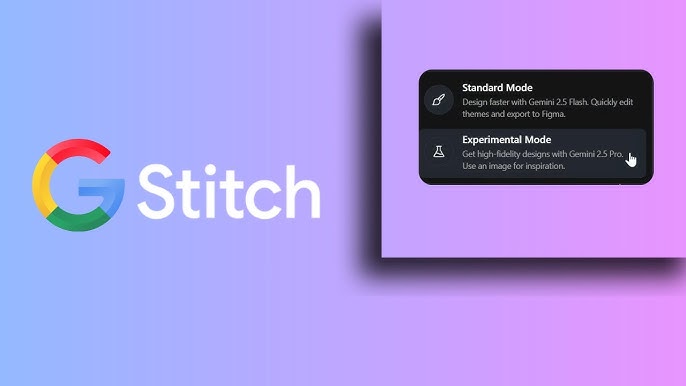
What is Google Stitch AI? Google Stitch is a free, experimental AI design tool from Google Labs that turns text prompts, sketches, or screenshots into complete mobile and web UI designs. Built on Gemini, it generates layouts, design systems, and exportable code, then lets you push the result into Figma or Google AI Studio for further development.
Is Google Stitch AI free? Yes. As of mid-2026, Stitch is completely free through Google Labs. There’s no paid tier instead, Google caps usage with monthly generation limits that differ between its “Standard” (Gemini Flash) and “Experimental” (Gemini Pro) modes, and those limits have changed more than once since launch.
How does Google Stitch AI work? You describe an interface in natural language, or upload a sketch, screenshot, or reference image. Stitch’s Gemini-based model interprets the input and produces a full UI layout, color system, typography, and components. You refine it with follow-up prompts, then export the result as code or send it to Figma.
Google Stitch AI vs Figma what’s the difference? Stitch generates UI designs from prompts in seconds; Figma is a precision design and collaboration tool built around manual control. Stitch is best for fast first drafts and ideation. Figma is better for pixel-level refinement, design systems at scale, and team collaboration. Most workflows now use both.
What are the best alternatives to Google Stitch AI? Strong alternatives include Uizard, Framer AI, v0 by Vercel, Galileo AI’s successor tools, Lovable, and Bolt.new each leaning more toward either polished UI generation (Uizard, Framer AI) or full working-app generation (v0, Lovable, Bolt.new) rather than Stitch’s design-first approach.
What Is Google Stitch AI?
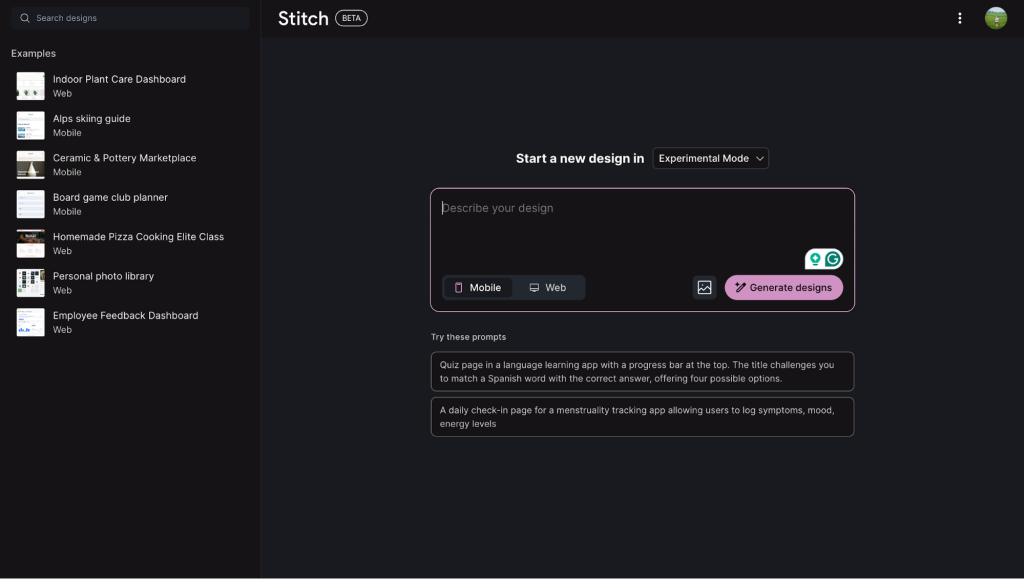
[IMAGE: Google Stitch Dashboard] Alt text: Google Stitch AI dashboard interface showing prompt input and generated UI canvas Caption: The Stitch home screen, where you start a new design from a text prompt or an uploaded image
Stitch is Google’s answer to a question every product team has asked at some point: why does the gap between “I have an idea” and “I have something to show a developer” still take days?
It’s a Gemini-powered tool, born out of Google Labs, that takes a plain-language description or a sketch, a screenshot, or even a reference URL and produces a working UI design. Not a mood board. Not a wireframe. A styled, structured interface with a coherent design system applied, ready to hand off to Figma or straight into code.
It launched at Google I/O 2025 as an experiment, and by early 2026 it had been rebuilt around an “AI-native” infinite canvas: instead of one prompt producing one static result, you work on a continuous surface where ideas branch, get compared side by side, and evolve through an agent that tracks the project’s history rather than treating each generation as a one-off.
There’s also a notable lineage here. Stitch absorbed much of the technology and positioning of Galileo AI, an earlier UI-generation startup, after Google’s broader push to fold AI design tooling into its own ecosystem. If you used Galileo AI before, Stitch’s prompt-to-UI core will feel familiar it’s just now backed by Gemini and wired directly into Google’s developer tools.
The integration that matters most: Stitch connects to Google AI Studio, Google’s environment for building Gemini-powered apps. A design generated in Stitch can be pushed into AI Studio and wired to live Gemini logic, turning a static mockup into something clickable and functional without leaving Google’s ecosystem. There’s also an MCP server and SDK, which means tools like Claude Code or Cursor can pull Stitch-generated designs directly into a codebase as part of an automated pipeline.
How Does Google Stitch AI Work?
[IMAGE: Google Stitch Prompt Input Screen] Alt text: Text prompt field in Google Stitch AI used to describe a UI design Caption: Writing a detailed prompt is the single biggest factor in output quality
The mechanics are simple on the surface and forgiving of how you start, but the quality ceiling depends heavily on input quality.
1. Choose your AI mode. Stitch offers two generation modes built on different Gemini models a faster “Standard” mode for lightweight iteration and a slower “Experimental” mode (built on a more capable Gemini Pro variant) for higher-fidelity output. The faster mode has a much higher monthly generation allowance; the higher-quality mode is capped lower.
2. Describe what you want, or show it. You can type a prompt, upload a wireframe or screenshot, paste in a reference image, or newer to the 2026 rebuild feed it an existing URL and have Stitch extract a design system from a live website.
3. Stitch generates a complete UI. Within roughly 20–90 seconds depending on mode and complexity, you get a full screen (or set of screens) with a consistent design system: spacing, typography, color tokens, and component styling applied automatically, not bolted on after the fact.
4. Iterate inside the canvas. Because the newer version is canvas-based rather than single-output, you don’t overwrite your first attempt with the second. Variations sit side by side. You can pull an element you liked from one generation into a prompt refining another.
5. Export. From here you can export design files to Figma, export front-end code (HTML/CSS, with Tailwind in many cases), or send the design into AI Studio to connect it to actual Gemini-powered functionality.
[IMAGE: Generated UI Output Example] Alt text: Example mobile app interface generated by Google Stitch AI from a text prompt Caption: A generated cinema-booking app screen clean, on-brand, and usable as a first draft
Hands-On: What Real Testing Shows
Rather than fabricate a personal anecdote, this section synthesizes patterns that show up consistently across independent hands-on reviews, tutorials, and testing write-ups from designers and developers who’ve actually run Stitch through real projects.
First impressions. Reviewers consistently describe the same arc: skepticism about another “AI builds your app” tool, followed by genuine surprise at how coherent the first output looks. Nobody describes the first generation as finished — but several independent testers note that it looks like “a mid-fidelity mockup,” not the generic, slightly-broken layouts common to earlier AI design tools.
Setup. There’s effectively no setup. A Google account is all that’s required, and the tool is browser-based with no install. This is repeatedly cited as a strength over tools that require account tiers, credit-card-gated trials, or local installs.
Prompt sensitivity. This is the single most repeated finding across every review: output quality scales almost linearly with prompt specificity. A vague prompt (“design a fitness app”) produces a generic, forgettable screen. A prompt that specifies product type, target user, visual tone, and the specific screens or flows needed produces something testers describe as “a usable starting point” rather than a placeholder. Reviewers who understand design fundamentals get dramatically more out of the tool than those who don’t — Stitch amplifies design judgment, it doesn’t substitute for it.
Speed. Generation time estimates shown in the tool itself are reported as accurate testers note 90-second estimates landing close to actual generation time for moderately complex prompts, and faster for Standard mode.
Design quality. The consensus across reviews: layout, color application, and responsiveness are handled well. What’s not handled well, by the tool’s own current limitations, is anything requiring design judgment beyond layout visual hierarchy decisions tied to a specific user journey, emotional tone matched to a brand, or accessibility nuance beyond basic contrast. Testers who pushed for WCAG-conscious adjustments (e.g., asking for higher-contrast dark themes) report that Stitch complies competently when asked directly, but doesn’t proactively flag accessibility issues unprompted.
Code export quality. This is the most-criticized area. The exported code (typically HTML + Tailwind CSS) is widely described as “a scaffold, not production code” a reasonable starting point that developers will need to refactor against their actual component library and codebase conventions. There’s no tech-stack selection; you get what Stitch gives you.
Figma export. Reports here are mixed and have changed across versions. Some testers report a smooth paste-into-Figma experience; others note that direct one-click Figma export has been inconsistent or missing in certain builds, requiring a manual copy/paste workflow instead. This is worth verifying against the current build before counting on it for a real handoff.
What consistently impresses testers: the speed-to-first-draft, the coherence of the generated design system without manual styling, and in the 2026 canvas rebuild the ability to compare multiple generations side by side instead of losing earlier attempts.
What consistently frustrates testers: the prompt-quality dependency (great results require design literacy to prompt well), the lack of fine-grained in-tool editing (you can’t click an element and nudge it like you would in Figma — you regenerate or export to edit), and the experimental-product reality that features, limits, and even export options can change without much notice.
Verdict across reviews: Stitch is broadly described as an accelerator for the first 70–80% of UI ideation, not a replacement for a designer’s judgment or a developer’s production code. The tools it’s most often paired with, rather than replaced by, are Figma (for finishing) and a real codebase (for the code Stitch exports).
[IMAGE: Stitch Export Options Screen] Alt text: Google Stitch AI export menu showing options to export code or send design to Figma Caption: Export options code, asset archive, or (build-dependent) direct Figma handoff
Is Google Stitch AI Free? Pricing Breakdown
Stitch has no paid tier as of this writing. It’s free through Google Labs, the same program that has hosted other experimental Google products. Instead of a subscription, Google rations usage by generation count per month, split across the two model tiers:
| Mode | Underlying model | Speed | Typical monthly cap |
|---|---|---|---|
| Standard | Gemini Flash variant | Fast | Several hundred generations/month |
| Experimental | Gemini Pro variant | Slower, higher fidelity | A few dozen generations/month |
Important caveat: these caps have been reported differently across reviews published just months apart in 2025–2026, which tells you the numbers move. Google has not committed to keeping Stitch free or to a long-term pricing model it’s explicitly a Labs experiment, and Labs experiments get sunset when they don’t hit internal usage or strategic targets. If you’re building a recurring workflow around it, that’s a real dependency risk worth planning around, not a hypothetical one.
Who Should Use Google Stitch AI?
Good fit:
- Solo founders and indie hackers who need a credible-looking first draft without hiring a designer
- Designers who want to skip the blank-canvas problem and start refining instead of originating
- Teams already building inside the Google/Gemini ecosystem (AI Studio, Gemini-powered apps) who benefit from the tight export pipeline
- Agencies producing quick client-facing concept variations before committing design hours
Poor fit:
- Teams needing real-time multi-user collaboration during the design phase Stitch is largely single-user
- Anyone needing production-ready code without developer rework
- Projects requiring deep accessibility or design-system governance from day one
- Non-UI design work Stitch doesn’t do presentations, social graphics, or marketing collateral; tools like Canva or Framer cover that ground instead

Pros and Cons
[IMAGE: Pros and Cons Comparison Graphic] Alt text: Visual breakdown of Google Stitch AI advantages and limitations Caption: Where Stitch earns its keep, and where it still falls short
| Pros | Cons |
|---|---|
| Completely free, generous Standard-mode limits | No paid tier means no guaranteed roadmap or stability |
| No install, just a Google account | Single-user — weak real-time collaboration |
| Strong first-draft design coherence | Output quality drops sharply with vague prompts |
| Native AI Studio integration for functional prototypes | Exported code needs developer rework, no stack choice |
| MCP/SDK support for coding-agent pipelines | Figma export has been inconsistent across builds |
| Side-by-side canvas for comparing iterations | No fine-grained in-tool element editing |
| Multi-modal input (text, sketch, screenshot, URL) | Experimental status — features can change or disappear |
Google Stitch AI vs. The Competition
This is a crowded category, and the tools in it solve genuinely different problems. Here’s where each one actually wins.
Stitch vs. Figma / Figma AI
Figma is still the professional standard for collaborative, precision UI design multi-user editing, design tokens at scale, dev handoff via Figma’s own inspect tools, and a massive plugin ecosystem. Figma has added its own AI features, but they’re assistive layers inside an existing manual workflow, not a prompt-to-full-design generator.
Stitch wins on: speed to first draft, zero learning curve, free generation at volume. Figma wins on: team collaboration, fine-grained control, production-grade design systems, ecosystem maturity.
Most realistic workflow: generate in Stitch, refine in Figma.
Stitch vs. Uizard
Uizard has focused longer on prompt-to-wireframe and screenshot-to-design conversion, with a more mature theming and component-editing layer inside its own editor. Uizard generally allows more in-tool manual adjustment than Stitch currently does.
Stitch wins on: Gemini-quality generation and Google ecosystem integration. Uizard wins on: in-tool editing depth and a longer track record with design teams.
Stitch vs. Framer AI
Framer has built AI generation directly into a tool that was already a strong website builder and publishing platform. If the end goal is a published, responsive website rather than a handoff to a separate dev team, Framer AI’s integrated build-and-publish pipeline is hard to match.
Stitch wins on: UI/app-screen generation and dev handoff flexibility. Framer AI wins on: going from design to a live, hosted website without leaving the tool.
Stitch vs. Lovable and Bolt.new
Lovable and Bolt.new aim higher up the stack they generate working full-stack applications from prompts, not just UI screens. They’re closer to “AI software engineer” than “AI designer.”
Stitch wins on: design quality and visual polish of the UI layer itself. Lovable/Bolt.new win on: producing an actually running application with backend logic, not just a front-end scaffold.
Stitch vs. Galileo AI
Galileo AI was an earlier, well-regarded prompt-to-UI tool, and much of its DNA is now inside Stitch following Google’s acquisition and integration of the technology. If you used Galileo AI before, you’re functionally looking at its successor, now with Gemini behind it and Google’s distribution and tooling around it.
Stitch vs. v0 by Vercel
v0 leans developer-first: it generates React components and full front-end code with a strong bias toward production-usable output, tightly integrated with Vercel’s deployment pipeline.
Stitch wins on: design-system coherence and visual generation quality for non-developers. v0 wins on: code quality and developer-ready output that needs less rework.
Stitch vs. Claude, ChatGPT, and Gemini (the general-purpose models)
This comparison gets asked a lot, and it’s worth being precise: Claude, ChatGPT, and Gemini’s chat interfaces are general-purpose assistants. They can write UI code, describe layouts, or even generate rough mockups when prompted carefully, but none of them are purpose-built design canvases with a generation pipeline, design-token system, or export-to-Figma flow the way Stitch is. Claude in particular is strong at writing clean, well-structured front-end code when given a detailed spec — often cleaner than what Stitch exports — but you’re working in a chat window, not a visual canvas, and you’re not getting the layout-and-color-system generation step Stitch automates.
Stitch wins on: purpose-built visual UI generation and design-system consistency. Claude/ChatGPT/Gemini win on: flexibility, code quality when prompted well, and the ability to reason about the why behind a design decision, not just generate one.
[IMAGE: Comparison Table Graphic Stitch vs Competitors] Alt text: Side-by-side comparison graphic of Google Stitch AI versus Figma, Uizard, Framer AI, v0, and Lovable Caption: Where each AI design and build tool sits on the design-to-code spectrum
Limitations Worth Knowing Before You Commit
- No fine-grained in-canvas editing. You regenerate or export; you don’t click-and-nudge.
- Single-user by default. Not built for live team collaboration during design.
- Code needs rework. Treat exports as a scaffold, not a deliverable.
- No tech-stack choice on export. You get what Stitch gives you, generally HTML/Tailwind.
- No SLA, no guarantee of longevity. It’s a Labs product; Google has sunset Labs experiments before.
- Region and availability can vary, given its experimental status.
Future Roadmap
Google hasn’t published a firm long-term roadmap, consistent with Stitch’s Labs status, but the direction since the 2025 launch has been consistent: deeper agentic capability (the “design agent” that reasons across a whole project’s evolution), broader multi-modal input (text, image, code, and now live URLs as design-system sources), and tighter integration with Google’s developer stack via the MCP server and SDK meaning coding agents like Claude Code or Cursor can pull Stitch output programmatically rather than through manual export. Whether Stitch eventually gets a paid tier, deeper Figma parity, or graduates out of Labs into a fully supported product is, as of mid-2026, an open question Google hasn’t answered.
Is Google Stitch AI Worth It?
For the specific job of getting from a blank page to a credible first design draft, yes and the price (free) makes the decision close to risk-free. The honest caveat is about scope: Stitch accelerates ideation and first drafts; it does not replace a designer’s judgment, a developer’s production code discipline, or Figma’s collaborative workflow. Treat it as the fastest way to get something real to react to, not as the last tool you’ll touch before shipping.
Related
- Claude AI Vs CHatGPT “Review Both Ai Tools”
- Jasper Ai Vs Writesonic Ai “Review Both Ai Tools“
Frequently Asked Questions
- Is Google Stitch AI completely free? Yes, as of mid-2026, with monthly generation limits rather than a paid subscription.
- Do I need design experience to use Google Stitch? No, but better design literacy produces noticeably better prompts and results.
- Can Google Stitch export to Figma? It supports exporting to Figma, though reliability has varied across builds — verify in the current version.
- What code does Google Stitch export? Typically HTML and CSS, often with Tailwind, intended as a starting point rather than production code.
- Is Google Stitch built on Gemini? Yes, it uses Gemini models, with a faster Standard mode and a higher-fidelity Experimental mode.
- Can Stitch generate mobile app UIs? Yes, it supports both mobile and web UI generation.
- Does Stitch support image or sketch input? Yes, you can upload sketches, screenshots, or reference images.
- Can Stitch copy an existing website’s design? Yes, newer versions can extract a design system from a URL.
- Is Google Stitch a replacement for Figma? No, it’s positioned as a fast first-draft generator that typically feeds into Figma for refinement.
- How long does Google Stitch take to generate a design? Roughly 20–90 seconds depending on mode and prompt complexity.
- Does Google Stitch have a mobile app? No, it’s browser-based.
- Is Google Stitch good for non-designers? Yes, that’s one of its core use cases, though results still depend on prompt quality.
- Can developers use Stitch’s output directly in production? Not without rework — treat exports as a scaffold.
- Does Google Stitch support real-time team collaboration? Not meaningfully at this stage; it’s largely single-user.
- What happened to Galileo AI? Its technology and positioning were largely folded into Stitch after Google’s involvement.
- Can I connect Stitch to my codebase automatically? Yes, via its MCP server and SDK, compatible with tools like Claude Code or Cursor.
- Does Stitch integrate with Google AI Studio? Yes, designs can be exported and wired to live Gemini functionality there.
- Is there a generation limit on Google Stitch? Yes, separate monthly caps apply to Standard and Experimental modes.
- Can Stitch design landing pages? Yes, alongside app screens, dashboards, and other UI types.
- Does Google Stitch do accessibility checks automatically? Not proactively; you generally need to request accessibility-conscious adjustments directly.
- Is Google Stitch available worldwide? Availability can vary by region given its experimental status.
- What’s the difference between Stitch’s two AI modes? Standard mode is faster with a higher generation cap; Experimental mode uses a more capable model for higher-fidelity output with a lower cap.
- Can I use Stitch for presentations or marketing graphics? No, it’s scoped to UI design, not general visual content.
- Will Google Stitch get a paid tier? Unconfirmed; Google hasn’t announced long-term pricing plans.
- Is Google Stitch safe for production design work? It’s reasonable for ideation and first drafts; production design work still benefits from a human designer’s refinement pass.
- How does Stitch compare to ChatGPT or Claude for UI design? General-purpose chat models can generate code or describe layouts, but lack Stitch’s purpose-built visual canvas and design-system generation pipeline.