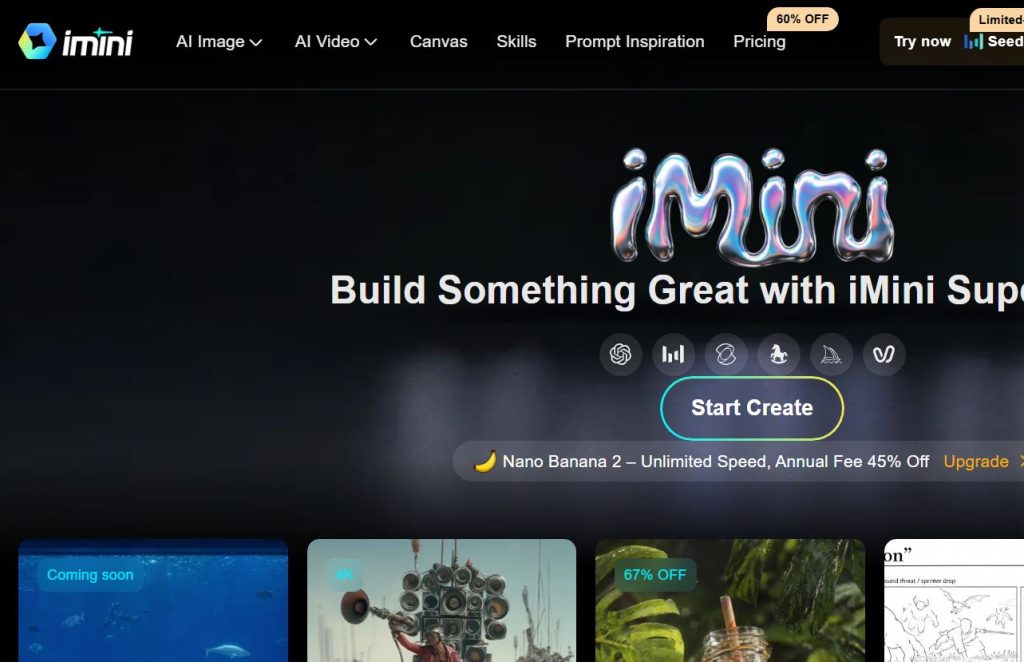
If you’ve searched for “Imini AI,” you’ve probably run into two different products that share almost the same name. One is iMini AI (imini.com), an all-in-one AI content creation platform for images, video, slides, documents, and research. The other is Amini (amini.ai), a separate company building sovereign data infrastructure for governments in the Global South. This article is about the first one , iMini AI, the creative and productivity platform , because that’s what most people searching this term are looking for.
iMini AI markets itself as a “Super Agent” that puts dozens of the world’s top AI models behind one login. Instead of paying for Midjourney, Runway, Sora, and a separate research assistant, you get one dashboard and one subscription. That’s the pitch, and it’s a compelling one in a market where AI tool subscriptions add up fast.
This guide covers everything you need to know before signing up: what iMini AI actually does, what it costs, how it compares to alternatives, and where it falls short. Every claim below is based on iMini’s own website, its pricing page, its help center, and independent reviews , nothing here is guessed or invented.
What Is Imini AI?
iMini AI is a web-based platform that combines AI image generation, AI video generation, an AI chat assistant, a deep research agent, a slide-deck generator, and a document generator into a single product. iMini AI describes itself as a comprehensive, all-in-one AI creation platform offering nearly all commercially available top-tier generative AI models, combined with high-efficiency creation tools and AI Agent capabilities.
Rather than building its own foundation models, iMini AI works as an aggregator. It licenses access to third-party models , image generators, video generators, and large language models , and wraps them in one interface with shared credits, shared templates, and an agent layer on top. This is similar in concept to tools like 1min.AI, though the product lineup and pricing differ.
The platform is organized around a “Super Agent” concept: you give it one instruction, and it plans, executes, and delivers results, orchestrating multiple large language models instead of forcing you to juggle separate prompts, models, and templates.
Company background: iMini AI does not publish detailed information about its founders, headquarters, or funding history on its main marketing pages or help center. Third-party AI tool directories list it as a standalone product without disclosing ownership details. If you need verified corporate information (registration, leadership, funding), it’s best to contact iMini directly at support@imini.com or business@imini.com, since we could not verify this from public sources.
Key Features
iMini AI’s feature set is broad. Here’s what’s actually available, based on the platform’s own product pages:
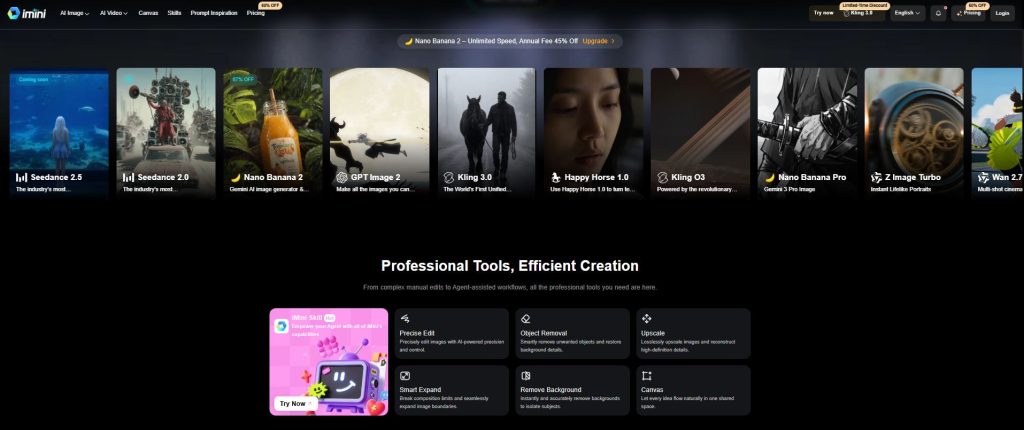
- AI Image Generator , text-to-image and image-to-image generation using a rotating roster of top models.
- AI Video Generator , text-to-video and image-to-video creation, including multi-shot and cinematic styles.
- Canvas , an infinite canvas workspace for combining, layering, and iterating on visual assets in one shared space.
- Deep Research Agent , an autonomous research tool that gathers information and produces structured reports.
- AI Slides Creator , turns a prompt into a formatted slide deck.
- AI Docs (Thematic Creation) , generates written documents and reports from a single instruction.
- AI Chat , a general-purpose chat assistant.
- Precise Edit , targeted, AI-assisted image editing.
- Smart Expand , extends an image’s borders beyond its original composition.
- Object Removal , removes unwanted elements and reconstructs the background.
- Background Removal , isolates subjects by stripping the background.
- Upscale , increases image resolution while reconstructing detail.
- iMini Skills , a library of pre-built workflows that extend what the Agent can do.
- Prompt Inspiration Library , a browsable gallery of prompts and styles to reference.
Third-Party Models Available Through iMini AI
iMini AI integrates a large and frequently updated list of third-party image and video models, including:
| Category | Models available (per iMini’s site, June 2026) |
| Image | GPT Image 1, GPT Image 2, Nano Banana, Nano Banana Pro, Nano Banana 2, Seedream 4.0, Seedream 4.5, Imagen 4.0 (and Fast/Ultra variants), Z Image Turbo, Qwen Image Plus, Qwen Image Edit, Midjourney (MJ Imagine) |
| Video | Sora 2, Kling 3.0, Kling 3.0 Omni, Kling O1, Kling 2.1, 2.5 Turbo, 2.6, Google Veo 3 and 3.1 (plus Fast variants), Seedance 2.0, 2.0 Mini, 2.0 Fast, 2.5 (coming soon), Wan 2.2 Flash, 2.5, 2.6, 2.7, Vidu Q1, Q2, Q2 Turbo, Q2 Pro, Hailuo 02, Hailuo 2.3, Happy Horse 1.0 |
| Language/chat models (Agent layer) | GPT-5, Gemini 2.5 Pro, Grok-4, and Claude 4, orchestrated together with up to 25 models at once |
Because these are licensed third-party models, availability changes as new versions ship. iMini itself notes that additional models are continuously being updated and released, so the exact list will look different by the time you read this.
How Imini AI Works
Using iMini AI generally follows the same pattern across its tools:
- You choose a tool , Image, Video, Chat, Deep Research, Slides, or Docs.
- You describe what you want in plain language, e.g., “create a new energy slide with market data.”
- iMini AI’s models generate the output, showing the estimated credit cost before you confirm generation.
- You review, edit (using tools like Smart Expand, Object Removal, or Upscale), and download the result.
- For agent-based tasks like research reports or slide decks, iMini plans the task, gathers information, and compiles a structured output rather than a single one-shot response.
The system is described as using dual-model verification, where two models cross-check outputs to reduce hallucinated or incorrect content in research and writing tasks. This is a meaningful differentiator if accurate, though it’s worth noting this claim comes from an independent review rather than iMini’s own marketing copy, so treat it as a reported feature rather than a guaranteed outcome.
Main Use Cases
iMini AI is positioned for a wide range of jobs:
- Social media content , templates optimized for platforms like Instagram, Facebook, and LinkedIn
- Marketing videos and product visuals , TVCs, product marketing clips, and short-form video ads
- Business research , market reports and consulting-style writeups
- Presentations , pitch decks and business slide creation
- Document drafting , reports, summaries, and structured written content
- Photo editing , background removal, object removal, upscaling, and image expansion
- Concept and print design , print ad design and concept design work
Benefits
- One subscription, many models. You avoid separately paying for Midjourney-style image tools, a video generator, and a research assistant.
- No technical skill required. The chat-first interface is built for people without prompt-engineering experience.
- Frequent model updates. New releases (Kling 3.0, GPT Image 2, Nano Banana Pro) get added quickly after they launch elsewhere.
- Commercial usage rights. iMini grants full usage and commercial rights for content generated on the platform, provided it complies with applicable laws.
- No rate limiting on paid plans. iMini states that all paid services will not be rate-limited, which matters if you’re on a deadline.
- Multi-tool workflow in one place. Moving from an AI-generated image to a slide deck to a written report doesn’t require switching platforms.
Limitations
No tool is perfect, and iMini AI has some clear trade-offs to weigh:
- Credit-based pricing can be confusing. Costs vary by model and task, so heavy users of premium models (like top-tier video generators) can burn through credits faster than expected.
- Dependent on third-party models. Because iMini licenses rather than builds its core models, quality and availability depend on those upstream providers’ terms and pricing.
- Learning curve for advanced features. A review platform notes iMini AI has a <cite index=”4-1″>potential learning curve for new users to fully leverage all AI services.
- Limited team/enterprise features. The same review notes <cite index=”4-1″>no explicit mention of team or enterprise collaboration features on the platform.
- Unused credits don’t roll over. On monthly plans, credits reset each billing cycle and unused credits are cleared rather than carried forward.
- Free plan is limited. The free tier is designed for testing, not production use , advanced agent features are gated behind paid plans.
- Company transparency is limited. Public information about the company itself (founders, headquarters, funding) is thin compared to more established AI vendors.
Pricing
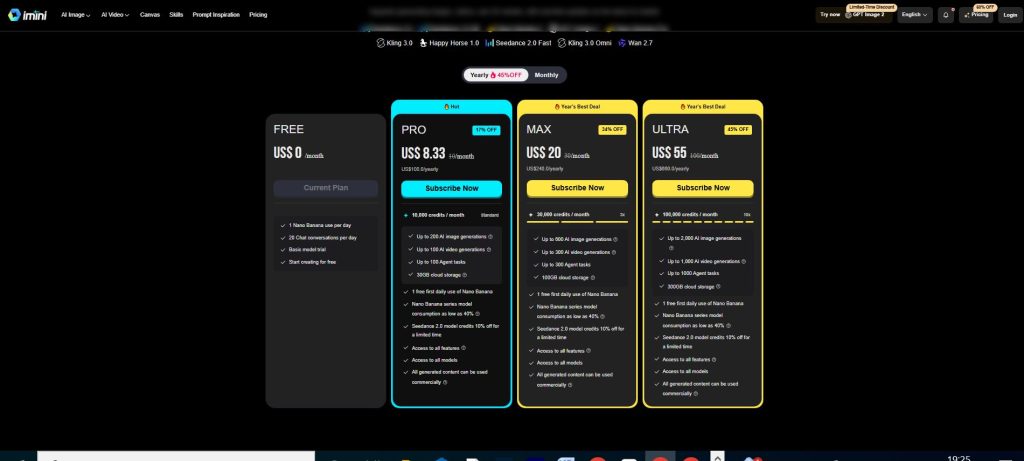
iMini AI runs on a credit system. Each tool requires a set number of credits, the exact cost is shown in a comparison table on the pricing page, and the precise number of credits needed for a task is displayed before you click “Generate.”
iMini offers a free plan with a limited number of daily chat rounds , reportedly around 50 , that excludes advanced agent features like slide creation or deep research generation. Paid plans start from around $10 per month and unlock agent capabilities plus support for multiple devices.
According to iMini’s own pricing FAQ: iMini AI offers four plans in total , a Free Plan with limited features, a Pro Plan with 10,000 credits, a Max Plan with 30,000 credits, and an Ultra Plan with 100,000 credits.
| Plan | Credits | Agent Features | Best For |
| Free | Limited (no bundled credit allotment published) | Not included | Testing the platform before buying |
| Pro | 10,000 credits/month | Included | Individuals with regular content needs |
| Max | 30,000 credits/month | Included | Frequent creators, small teams |
| Ultra | 100,000 credits/month | Included | Heavy users, agencies |
Important pricing notes:
- You can upgrade to a higher-tier plan at any time or purchase one-off credit packs whenever you need more credits.
- If you switch from a monthly plan to a yearly plan, your remaining monthly subscription value is recalculated and applied to the new yearly plan.
- Monthly-plan credits refresh on your billing date, and any unused credits are cleared rather than rolled over.
- You can cancel your subscription at any time.
- Accepted payment methods include credit cards, bank transfer, Amazon Pay, Klarna, and Alipay.
Because exact monthly dollar prices for each tier weren’t consistently listed in a static, citable format at the time of writing (the pricing page loads figures dynamically and may show region- or promotion-specific rates), we recommend checking the official iMini pricing page directly for current numbers before subscribing.
Free Plan
The free plan typically includes a limited number of daily chat rounds , around 50 , but excludes advanced agent features such as slide generation or deep research. It’s suitable for exploring the interface and testing basic image or chat generation, but it won’t give you access to the Deep Research agent, the Slides creator, or the higher-volume image and video generation that the paid tiers unlock.
Supported Platforms
iMini AI is a web-based platform, accessed through a browser at imini.com. Based on available information:
- Works on any modern desktop browser (Windows, macOS, Linux via browser)
- Accessible on mobile browsers, though there’s no confirmed dedicated native mobile app on the App Store or Google Play at the time of writing
- Paid plans support multiple devices, with device limits increasing at higher tiers (1 device on Free and Plus tiers, up to 2–5 devices on Pro/Max tiers)
If a dedicated mobile app matters to you, verify current availability on iMini’s help center or app stores before subscribing, since this can change.
Security & Privacy
iMini AI’s own pricing and product pages do not go into detail about encryption standards, data retention policies, or compliance certifications. Some third-party software directories describe the platform as using end-to-end encryption for user data, but this isn’t something we could independently confirm from iMini’s official site content. If data security and compliance are a priority for your use case , for example, handling client or proprietary business information through the Deep Research or Docs agent , read iMini’s actual privacy policy and terms of service in full, and consider contacting support@imini.com with specific compliance questions before uploading sensitive material.
Integrations
iMini AI’s main “integrations” are the AI models it aggregates rather than third-party software integrations like Slack, Notion, or Zapier. As of mid-2026, it bundles access to image and video models from providers including Google (Veo, Imagen, Nano Banana/Gemini image models), OpenAI (GPT Image 1 and 2), Kuaishou (Kling), ByteDance (Seedream/Seedance), Alibaba (Wan, Qwen), MiniMax (Hailuo), Vidu, and Midjourney, plus chat-layer access to models like GPT-5, Gemini 2.5 Pro, Grok-4, and Claude 4. No workflow-automation integrations (Zapier, Make, Slack, etc.) were listed on the official pages reviewed for this article.
Pros & Cons
| Pros | Cons |
| Access to dozens of top image, video, and chat models under one subscription | Credit-based pricing can be hard to predict for heavy video use |
| No prompt-engineering skill required | Free plan is quite limited (no agent features) |
| Frequent additions of newly released models | Limited public detail on security/compliance certifications |
| Commercial usage rights included on generated content | No confirmed native mobile app |
| Paid plans are not rate-limited | Learning curve to use every tool effectively |
| Deep Research agent with reported dual-model verification | No clear enterprise/team collaboration tier |
| Multiple payment methods, including Klarna and Alipay | Company background/ownership not publicly detailed |
Comparison with Alternatives
Here’s how iMini AI stacks up against tools it’s most often compared to, based on publicly available pricing and features:
| Tool | Model | Starting Price | Core Focus |
| iMini AI | Aggregator (image, video, chat, agent) | <cite index=”20-1″>~$10/month for paid tiers | All-in-one creation + research agent |
| Midjourney | Own image model | <cite index=”12-1″>$10/month | High-quality stylized image generation only |
| Runway | Own video/image models | <cite index=”12-1″>$15/month | Professional AI video editing |
| 1min.AI | Aggregator (text, image, audio, video) | <cite index=”3-1″>Free daily credits, paid tiers available | All-in-one AI aggregator, similar model to iMini |
How to think about the choice: If you only need best-in-class image generation, a dedicated tool like Midjourney may give you more consistent style control. If your priority is professional video editing workflows, Runway’s dedicated tooling is more mature. If you want one login for images, video, research, and slides , and you’re comfortable with a credit system , iMini AI’s breadth is the main selling point, and it’s most directly comparable to other aggregator platforms like 1min.AI rather than single-purpose tools.
Best Use Cases
iMini AI tends to make the most sense for:
- Solo marketers and small business owners who need images, short videos, and slide decks but don’t want five separate subscriptions
- Social media managers producing high-volume, platform-optimized visual content
- Freelancers who need to move quickly between research, writing, and visual asset creation for client work
- Students or professionals who want a single AI research agent for early-stage report drafting
Who Should Use It?
iMini AI is best suited to individuals and small teams who value breadth and convenience over the absolute best output from any single specialized tool. If your workflow spans multiple content types , say, generating a product image, then a short promotional video, then a one-page research brief , consolidating into one credit pool can save both money and time compared to juggling separate subscriptions.
It’s less suited to enterprises needing formal compliance documentation, dedicated account management, or deep team-collaboration features, since none of those were clearly advertised on iMini’s official pages at the time of writing.
Expert Tips
- Check the credit cost before generating. Since iMini shows the credit cost per action, get in the habit of checking it before running expensive video generations, especially on longer or higher-resolution outputs.
- Match the model to the task. Not every image or video model performs the same way for every style. Test a few models on a small task before committing credits to a big batch.
- Use the free plan to learn the interface first. Since the free plan doesn’t include agent features, use it purely to understand image/video generation before upgrading to test Deep Research or Slides.
- Watch your billing cycle. Since unused monthly credits don’t roll over, try to time larger projects to align with the start of your billing cycle rather than the end.
- Read the terms for commercial use carefully. Commercial rights are granted, but they’re conditioned on compliance with applicable laws , double-check this if you’re generating content involving real people, brands, or copyrighted styles.
Common Mistakes
- Assuming all models cost the same credits. Premium or higher-resolution models typically cost more, and skipping the cost preview can drain your monthly allotment fast.
- Buying a high-tier plan before testing the free version. Start smaller, understand your actual usage pattern, then scale up.
- Ignoring the “no rollover” rule. Loading up on generation right before a plan renews, rather than spacing tasks out, wastes unused credits.
- Skipping the privacy policy for sensitive work. If you’re feeding client or proprietary data into the Deep Research or Docs agent, don’t assume enterprise-grade data handling without confirming it directly.
- Confusing iMini AI with Amini. These are two unrelated companies with similar-sounding names , double check you’re on the right site before signing up or entering payment details.
Frequently Asked Questions
What is Imini AI used for? It’s used for generating AI images and videos, running AI-assisted research, creating slide decks, and drafting documents, all from one chat-based interface.
Is Imini AI free?There is a free plan with a limited number of daily chat rounds, but it excludes advanced agent features like slide or research generation.
How much does Imini AI cost? Paid plans start from around $10 per month, with four total plans , Free, Pro (10,000 credits), Max (30,000 credits), and Ultra (100,000 credits).
Can I use Imini AI–generated content commercially? Yes , full usage and commercial rights are granted for content generated on iMini, provided it complies with applicable laws and regulations.
What AI models does Imini AI include? It includes image models like GPT Image 2 and Nano Banana Pro, video models like Sora 2, Veo 3.1, and Kling 3.0, and chat-layer models like GPT-5, Gemini 2.5 Pro, Grok-4, and Claude 4.
Does Imini AI have a mobile app? There’s no confirmed dedicated native mobile app; it’s primarily a web-based platform accessible through a browser.
How do credits work on Imini AI? Each tool has a set credit cost, shown before you generate, and you can upgrade plans or buy one-off credit packs if you run out.
Do unused credits roll over? No , monthly credits refresh on your billing date and any unused credits are cleared.
Can I cancel my Imini AI subscription anytime? Yes, you can cancel your subscription at any time.
What payment methods does Imini AI accept? Credit cards, bank transfer, Amazon Pay, Klarna, and Alipay.
Is Imini AI the same as Amini? No. Amini (amini.ai) is a separate company focused on data infrastructure for the Global South. iMini AI (imini.com) is an unrelated AI content creation platform.
How is Imini AI different from Midjourney or Runway? Midjourney and Runway each focus on one type of output (images and video, respectively) using their own models. iMini AI aggregates many different providers’ models plus a research and document agent under one subscription.
Does Imini AI reduce AI hallucinations in research tasks? One independent review describes iMini’s Deep Research agent as using dual-model verification, where two models cross-check outputs, but this claim comes from a third-party review rather than iMini’s own published documentation.
Is Imini AI good for beginners? Yes , the platform is designed for non-technical users who only need to give a plain-language instruction.
Who are Imini AI’s main competitors? Aggregator platforms like 1min.AI, and single-purpose tools like Midjourney (images) and Runway (video), depending on which specific feature you’re comparing.
Expert Verdict
iMini AI earns its place in the “all-in-one AI platform” category by doing something genuinely useful: reducing the number of subscriptions you need to juggle for content creation. Its biggest strength is breadth , new models get added quickly, and the credit system lets you flex between cheap and premium generations as needed. Its biggest weaknesses are transparency (limited public information on the company itself and on data security specifics) and the learning curve that comes with having this many tools in one place.
If you’re a solo creator, marketer, or freelancer producing a mix of images, video, and written content, iMini AI is worth testing on the free plan before committing to a paid tier. If you need a single best-in-class tool for one specific job , polished stylized images, or professional video editing , a dedicated platform may still serve you better.
Final Words
Imini AI is not a single AI model , it’s a platform that bundles many of them, wrapped in a chat-first interface and a credit-based billing system. That combination makes it flexible but also means its quality ceiling is tied to whichever third-party models it currently licenses. Before subscribing, test the free tier, review the current pricing page for exact costs, and read the actual privacy policy if you plan to use it for sensitive business content. For content-heavy workflows that span images, video, research, and documents, it’s a genuinely efficient option , just go in with clear expectations about what’s confirmed and what still needs your own verification.