If you’ve spent any time editing photos recently, you already know that AI has changed what’s possible and fast. Background removal that used to take 20 minutes in Photoshop now takes three seconds. Portrait retouching that once required a trained hand is now a single click. Object removal, sky replacement, lighting correction all of it has gotten faster and far more accessible. This Article Will help you to find out Best AI Photo Editing Tools 2026.
But with so many tools claiming to be the best AI photo editing tools on the market, it’s genuinely hard to know which ones are worth your time and money. Some are excellent. Some are oversold. And a few are only good at one specific thing.
We tested eight of the most talked-about AI photo editors in 2026 across desktop, browser, and mobile to give you an honest, detailed breakdown. Whether you’re a professional photographer, an Etsy seller trying to improve product shots, or someone who just wants better photos for Instagram, this guide covers it all.
Table of Contents
What Makes an AI Photo Editor Worth Using?
Not every tool that slaps “AI” in its name deserves the label. The ones that genuinely earn it share a few qualities.
Speed without sacrificing quality. AI editing should save you time, not make you fix its mistakes. The best tools produce results you can actually use, not results that need heavy manual cleanup afterward.
Accuracy on complex tasks. Background removal, subject masking, and skin retouching all have failure modes — edges that bleed, skin that looks plastic, artifacts around hair. Good AI tools handle these with minimal fuss.
Workflow fit. A tool that’s great for a social media manager is not necessarily great for a wedding photographer. The best editors serve a specific workflow well, rather than trying to do everything adequately.
Transparency about limitations. No AI tool is perfect. The ones worth recommending are upfront about what they can and can’t do.
How We Evaluated These Tools
Our evaluation process involved hands-on testing across multiple categories:
- Background removal on photos with complex edges (hair, transparent objects, fur)
- Portrait retouching at different intensity levels
- Product photo enhancement for eCommerce mockups
- Generative fill and object removal
- Performance on mobile vs. desktop
- Pricing clarity and value at each tier
- Privacy policies and data handling
We tested each tool across multiple use cases, not just the one it’s best known for. Where relevant, we note which tools produced results good enough to publish without further editing, and which required manual cleanup.
Best AI Photo Editing Tools 2026
1. Adobe Photoshop Best Overall AI Photo Editor
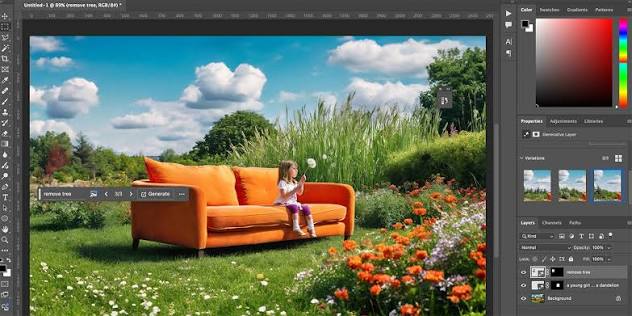
Best for: Professional photographers, designers, advanced retouchers Pricing: From $20.99/month (Photography plan), included in Creative Cloud from $54.99/month Platforms: Desktop (Windows, Mac), iPad Free tier: No (7-day trial available)
Adobe Photoshop has been the gold standard for photo editing for decades. In 2024 and 2025, Adobe significantly expanded its AI toolkit under the Firefly banner, and the results are genuinely impressive.
The standout feature is Generative Fill you select an area, type a text prompt, and Photoshop generates new content that blends into the existing photo. During testing, we removed a distracting tourist from a landscape shot using Generative Fill, and the result was publication-ready with no further cleanup. The same task in a competing tool required significant manual work.
Remove and Replace is equally strong. Object removal has always been a pain point in Photoshop, but the AI-powered version now handles complex backgrounds far better than the old Content-Aware Fill.
The Generative Expand tool lets you extend the borders of a photo useful if you need to reformat an image from square to widescreen for a banner or billboard without cropping the subject. Adobe photoshop is every time Best AI Photo Editing Tools 2026 .
Pros:
- Industry-standard quality and precision
- Generative Fill is among the best in class
- Enormous ecosystem of tutorials and community support
- Non-destructive editing with full layer control
- Strong privacy policy Adobe Firefly is trained on licensed content
Cons:
- Subscription-only model; no perpetual license
- Steep learning curve for new users
- Heavy system requirements; not suitable for low-powered machines
- iPad version lacks several desktop features
Learning curve: High. Photoshop is not the tool you pick up in an afternoon. For users who need AI tools without the complexity, other options on this list are more approachable.
Privacy note: Adobe states that Firefly AI is trained on Adobe Stock and licensed content, not on user-uploaded photos. Creative Cloud subscribers can opt out of having their content used for AI training.
Best use case: Professional retouching, compositing, editorial and commercial photography, anything that requires precision and manual control alongside AI assistance.
Click Here For Adobe Photoshop
2. Canva Best AI Photo Editor 2026 for Non-Designers
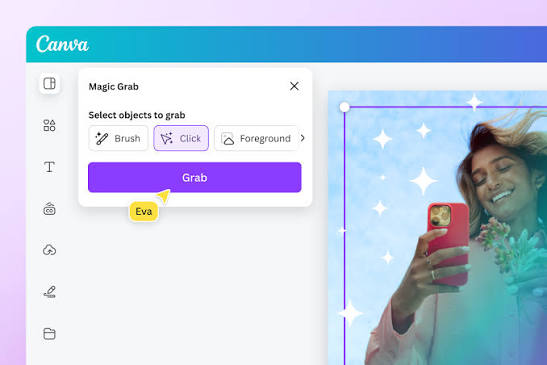
Best for: Social media managers, marketers, small business owners Pricing: Free plan available; Canva Pro from $14.99/month Platforms: Web, iOS, Android, Desktop app Free tier: Yes (limited AI features)
Canva one of the Best AI Photo Editing Tools 2026 has transformed from a graphic design tool into a full creative suite with AI photo editing built in. For non-photographers and non-designers, it remains one of the most accessible options available.
The Magic Studio suite includes background removal, a text-to-image generator, Magic Eraser for object removal, and Magic Edit for replacing selected areas. For everyday social media content, these tools work well and quickly.
In our testing, Canva’s background remover handled clean product shots and portraits without issues. It struggled slightly on images with complex or wispy edges fine hair and transparent objects were noticeably less accurate compared to PhotoRoom or Adobe.
What Canva gets right is the end-to-end workflow. You can edit a photo, drop it into a template, resize it for multiple platforms, and export all inside one tool. For a social media creator who doesn’t want to juggle five applications, that matters.
Pros:
- Excellent free tier for basic use
- Very easy to learn virtually no curve for basic tasks
- Strong template library speeds up content creation
- Solid mobile app experience
- All-in-one design and editing workflow
Cons:
- AI photo tools are not as precise as dedicated editors
- Advanced retouching is limited
- Some AI features are Pro-only
- Not suitable for high-end professional work
Learning curve: Very low. One of the easiest tools on this list to pick up from zero.
Mobile support: Excellent. The mobile app handles AI editing tasks well and is one of the strongest on mobile in this category.
Best use case: Social media content, marketing materials, small business branding, quick photo cleanup for non-professionals.
Click Here For Canva Best Ai Photo Editor 2026
3. Luminar Neo Best AI Photo Editor 2026 for Photographers
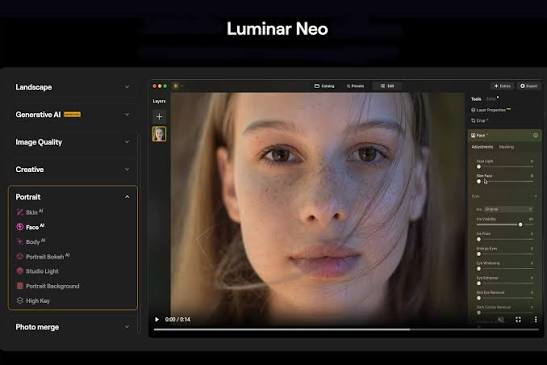
Best for: Landscape photographers, portrait photographers, hobbyists upgrading from Lightroom Pricing: From $9.95/month; perpetual license options available (around $99–$149 one-time) Platforms: Desktop (Windows, Mac); plugin for Lightroom and Photoshop Free tier: No (14-day trial)
Luminar Neo from Skylum is built specifically for photographers, and it shows. The AI tools here are photography-native in a way that general-purpose editors aren’t.
Sky AI is a standout it identifies and replaces skies in landscape photos, including reflections in water, with accuracy that’s hard to match. In our tests on landscape images, the sky replacement looked natural even on complex horizon lines. This is one of the better implementations of the feature available anywhere.
Portrait AI handles skin retouching, eye enhancement, and facial feature adjustments. At moderate settings, the results look natural. Pushed too high, like most portrait AI tools, it starts to look plastic. For photographers, the key is that the controls are granular enough to keep retouching subtle.
The Relight AI tool is genuinely useful it adjusts lighting in a photo after the fact, brightening or darkening foreground and background elements separately. Wedding and event photographers in particular will find this saves significant time.
Luminar Neo also integrates as a plugin for Lightroom and Photoshop, which is a major advantage for photographers already embedded in an Adobe workflow.
Pros:
- Built specifically for photographers
- Sky AI is one of the best implementations available
- One-time perpetual license option available
- Lightroom/Photoshop plugin support
- Strong batch editing capabilities
Cons:
- Can be slow on older machines
- Not a complete replacement for Lightroom as a library manager
- AI results can occasionally be inconsistent across batches
- Mobile app is limited compared to desktop
Learning curve: Medium. More accessible than Photoshop, but built for users with some photography knowledge.
Best use case: Landscape and travel photography, portrait retouching, professional photographers who want AI tools without the complexity of Photoshop.
Click here for luminor Neo Best AI Photo Editing Tools 2026
4. PhotoRoom Best AI Photo Editing Tool 2026 for Product Photography

Best for: eCommerce sellers, Etsy sellers, Amazon sellers, small business product shoots Pricing: Free plan available; Pro from $9.99/month; Business plans available Platforms: iOS, Android, Web Free tier: Yes (with watermark)
PhotoRoom was built from the ground up for product photography. That focus is its greatest strength. If you sell products online and need clean, professional-looking images without a photography studio, this is the tool to know about.
Background removal is PhotoRoom’s core capability, and it’s among the best we tested. In our evaluation, it handled complex product images glass bottles, jewelry, fabrics with frayed edges more accurately than most competitors. The resulting cutouts required minimal cleanup.
The Instant Backgrounds feature lets you drop products into lifestyle scenes or solid-color studio backdrops in seconds. For Etsy sellers working without a physical studio, this alone is worth the subscription price.
AI batch processing is available on higher tiers and lets you process dozens of product images at once with consistent backgrounds and formatting a significant time-saver for sellers with large catalogs.
For photographers, it’s worth noting that PhotoRoom is narrowly focused on product photography. It’s not a general-purpose editor, and it doesn’t try to be. Portrait retouching, landscape editing, and creative effects are not its strengths.
Pros:
- Best-in-class background removal for product images
- Instant AI backgrounds work well for eCommerce listings
- Batch processing for high-volume sellers
- Strong mobile app usable without desktop
- Affordable entry-level pricing
Cons:
- Limited outside of product photography use cases
- Free tier adds watermarks
- Not suitable for portrait or landscape work
- Advanced features require paid plans
Learning curve: Very low. The interface is focused and intuitive.
Mobile support: Excellent. Designed primarily as a mobile-first tool.
Best use case: Amazon, Etsy, Shopify, and eBay sellers; product photographers; small business owners who shoot their own product photos.
Click here for PhotoRoom Best AI photo Editing Tool 2026
5. Remini Best AI Photo Enhancer for Old or Low-Resolution Photos
Best for: Photo restoration, enhancing old or blurry photos, portrait sharpening Pricing: Free with limits; Pro from $9.99/month or $29.99/year Platforms: iOS, Android, Web Free tier: Yes (limited enhancements per day)
Remini focuses on a specific problem: making low-quality photos look better. It’s particularly well-known for its ability to sharpen blurry or low-resolution images and restore old or degraded photographs.
During testing, we ran several genuinely old family photos through Remini scanned prints from the 1970s and 1980s — and the results were striking. Details that were lost to aging and low resolution came back with surprising clarity. Faces in particular showed significant improvement.
The AI Portrait feature also performs well for headshots and selfies, adding detail and clarity without the plastic look that plagues some portrait AI tools.
Remini is mobile-first, which means the desktop web experience is more limited. For someone restoring old photos as a hobby or a personal project, the mobile app is more than enough.
Pros:
- Excellent at photo restoration and upscaling
- Works well on old, degraded, or blurry images
- Simple to use minimal learning curve
- Affordable pricing with a useful free tier
- Strong portrait enhancement results
Cons:
- Limited editing features beyond enhancement
- Mobile-first; web version has fewer options
- Not suitable for complex photo editing tasks
- Can occasionally over-sharpen fine details
Learning curve: Very low.
Privacy note: Remini processes images on its servers. Users should review the privacy policy before uploading sensitive or personal photos.
Best use case: Restoring old family photos, enhancing low-resolution images, improving selfies and casual portraits.
6. Pixlr Best Free Browser-Based and Best AI Photo Editing Tools 2026
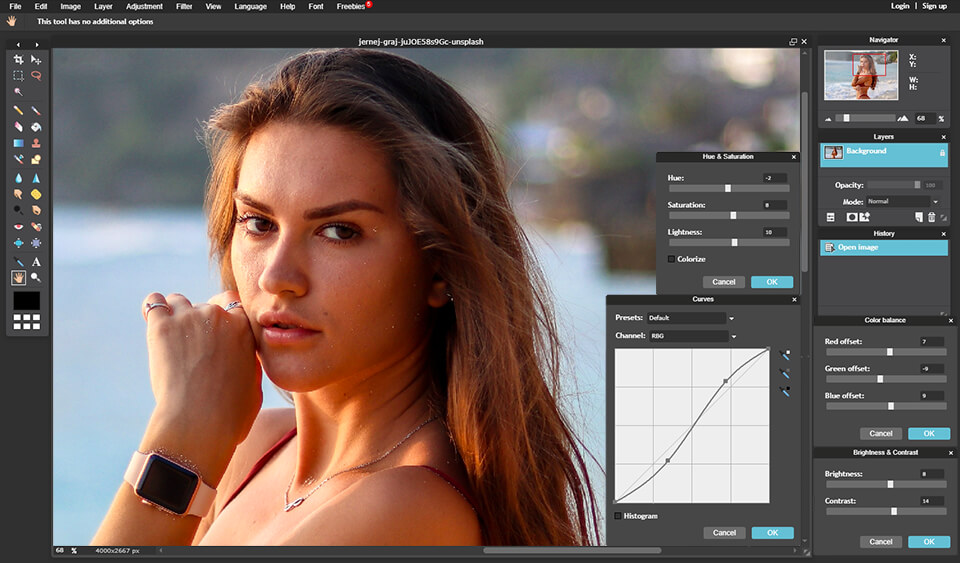
Best for: Users who want a Photoshop-like experience without installing software Pricing: Free tier available; Pixlr Plus from $7.99/month; Team plans available Platforms: Web (browser-based), iOS, Android Free tier: Yes (with ads)
Pixlr is a long-standing browser-based photo editor that has been adding AI features progressively. It sits in an interesting middle ground more capable than a basic editor, but far more accessible than Photoshop, and free to start.
AI Remove Background works quickly and competently on clean photos. AI Generative Fill is available on paid plans and handles basic object removal and replacement tasks well enough for most non-professional use.
In our testing, Pixlr’s free tier is genuinely useful but ad-supported, which can interrupt workflow. The paid tier removes ads and unlocks more AI credits for generative features.
For users in Europe or the UK looking for a capable free editor without installing anything, Pixlr is one of the more practical options. It runs entirely in the browser, which makes it ideal for shared computers, Chromebooks, or situations where you can’t install software.
Pros:
- Genuinely capable free tier
- No installation required — runs in browser
- Familiar Photoshop-like interface
- AI background removal works well on clean images
- Good range of manual tools alongside AI features
Cons:
- Free tier is ad-supported
- AI features are limited on free plan (credit-based system)
- Can be slow on complex operations in browser
- Not suitable for professional-level output
Learning curve: Low to medium, depending on how deep you go.
Mobile support: Available but less capable than the browser version.
Best use case: Hobbyists, students, casual users who want a capable free editor without installation.
click here for pixler best ai photo editing tools 2026
7. Clipdrop Best AI Tool for Specific Tasks
Best for: Quick, task-specific AI editing background removal, upscaling, relighting Pricing: Free tier available; Pro from $9.99/month Platforms: Web, iOS, Android Free tier: Yes (with limits)
Clipdrop, now part of the Stability AI ecosystem, offers a collection of individual AI tools rather than a full editing suite. Think of it as a toolkit rather than an editor.
The tools include: background removal, image upscaling, object removal, relighting, sky replacement, and image generation. Each one is presented as a standalone task you upload a photo, the AI does one specific thing, and you download the result.
Relight is one of the more unique offerings here. It lets you adjust the light source in a photo by moving a virtual light around the scene, which can salvage an otherwise flat or poorly-lit shot. In our testing, it worked remarkably well on portraits and some product photos.
The AI Upscaler also performed well in testing it enlarged images by 2x and 4x with noticeably better quality than basic interpolation. For photographers looking to print a small image at a larger size, this is genuinely useful.
Clipdrop is not a complete editing environment. If you need to do multiple edits on one photo in sequence, you’ll be downloading and re-uploading between tools a limitation that becomes frustrating in a professional workflow.
Pros:
- Relight tool is unique and genuinely useful
- Clean, focused interface for each task
- Good AI upscaling quality
- Accessible via API for developers
- Reasonable free tier for light use
Cons:
- Not a cohesive editing environment
- Task-by-task workflow gets tedious for multiple edits
- Some tools require Pro subscription
- Not suitable as a primary editing tool
API availability: Yes. Clipdrop offers API access for developers who want to integrate its AI tools into their own applications.
Best use case: Developers needing AI editing via API, users who need one specific task done quickly, photographers who need relighting or upscaling tools as a supplement to their main editor.
8. Fotor Best All-Around Free AI Photo Editor
Best for: Casual users, bloggers, small business owners Pricing: Free plan; Fotor Pro from $8.99/month; Pro+ from $19.99/month Platforms: Web, Windows, Mac, iOS, Android Free tier: Yes
Fotor is one of the more complete free options available. It covers photo editing, collage making, design templates, and a growing set of AI tools all in a relatively clean, beginner-friendly interface.
AI Enhancer runs one-click improvements on exposure, color, and sharpness. The results in testing were modest but genuinely improved overall image quality on casual snapshots. Don’t expect Lightroom-level color science, but for quick improvement on everyday photos it works. The main feature of Best AI Photo Editing Tools 2026.
AI Background Remover is included in the free tier with daily limits. It performed competently in our tests on portraits and simple product shots, though it was less accurate on complex backgrounds or fine hair.
The AI Art Generator and other generative Best AI Photo Editing Tools 2026 are available but gated behind Pro or Pro+ plans. The free tier is meaningfully capable for basic editing, which is increasingly rare.
For bloggers in Germany, France, and the UK who just need a fast, free tool that works across devices without a steep learning curve, Fotor is worth bookmarking.
Pros:
- Good free tier with useful editing tools
- Available across all major platforms
- One-click AI enhancement works well for casual photos
- Includes design templates like Canva, though less polished
- Simple enough for true beginners
Cons:
- AI tools are not as precise as dedicated tools
- Advanced features require paid plans
- Not suitable for professional photo work
- AI Art Generator results are inconsistent
Learning curve: Very low.
Mobile support: Good. Mobile apps are well-maintained.
Best use case: Bloggers, casual users, people who need quick photo improvements without subscribing to anything.
Comparison Table: Best AI Photo Editing Tools in 2026
| Tool | Best For | Free Tier | Starting Price | Desktop | Mobile | API |
| Adobe Photoshop | Professionals | No (trial) | $20.99/mo | ✅ | Partial | ✅ |
| Canva | Social media & non-designers | ✅ | $14.99/mo | ✅ | ✅ | ✅ |
| Luminar Neo | Photographers | No (trial) | $9.95/mo | ✅ | Limited | ❌ |
| PhotoRoom | eCommerce & product | ✅ (watermark) | $9.99/mo | Web | ✅ | ✅ |
| Remini | Photo restoration | ✅ (limited) | $9.99/mo | Web | ✅ | ❌ |
| Pixlr | Free browser editing | ✅ (ads) | $7.99/mo | Web | ✅ | ❌ |
| Clipdrop | Task-specific AI tools | ✅ (limited) | $9.99/mo | Web | ✅ | ✅ |
| Fotor | All-around casual use | ✅ | $8.99/mo | ✅ | ✅ | ❌ |
Best AI Photo Editing Tools 2026
If you’re not ready to commit to a paid subscription, these offer the strongest free experiences:
1. Canva one of the Best AI Photo Editing Tools 2026, Best free tier overall. Background removal, basic AI enhancement, and a vast template library are available without paying, though some AI features require Pro. Ideal for social media content and basic marketing materials.
2. Fotor Also one of the Best AI Photo Editing Tools 2026 Solid all-around free editor with daily AI enhancement and background removal. Covers most everyday photo editing needs without cost.
3. Pixlr The closest thing to a free Photoshop in a browser. Ad-supported, but functionally capable. Best for users who want layer-based editing without installing software. I also recommended Best AI Photo Editing Tools 2026.
4. Remini Free tier offers daily photo enhancement enhancements. Good for restoring old or blurry photos without spending anything. you love this Best AI Photo Editing Tools 2026 .
5. PhotoRoom Best AI Photo Editing Tools 2026 Free tier includes background removal with watermarks. Worth using if you need clean product images and don’t mind the watermark for internal use.
Best AI Tools for Professional Photographers
Professionals have specific needs: precision, non-destructive editing, batch processing, and workflow integration with existing tools like Lightroom.
Top picks:
- Adobe Photoshop remains the strongest choice for complex, precision-heavy work. Generative Fill and Remove & Replace are genuinely useful additions to a professional workflow, not just novelties.
- Luminar Neo is the best AI-first alternative for photographers who find Photoshop’s complexity unnecessary. Its Sky AI and Relight AI tools are strong enough to use professionally. The Lightroom plugin integration is a significant selling point.
- Clipdrop is worth bookmarking for specific tasks — upscaling for print, relighting for salvageable shots — as a supplement to a primary editor.
For photographers shooting portrait sessions, Luminar Neo’s Portrait AI combined with precise manual sliders gives more control than tools like Remini. For landscape and travel photographers, Sky AI in Luminar Neo is the standout feature of 2026.
Best for Product Photography and eCommerce
Sellers on Amazon, Etsy, Shopify, and similar platforms have one consistent need: clean, professional product images without a studio budget.
Top pick: PhotoRoom
PhotoRoom was built specifically for this use case, and it shows. In our evaluation, it produced cleaner background removals on product photos than any other tool tested. The AI background library lets you place products into lifestyle contexts instantly.
For high-volume sellers running batch operations on dozens or hundreds of SKUs, PhotoRoom’s batch processing on Business plans is the most practical solution available.
Second pick: Canva
For sellers who also create promotional graphics, banners, and social content alongside product photos, Canva handles both. The product photography AI tools are less precise than PhotoRoom, but the end-to-end design workflow offsets that trade-off for many users.
Also worth considering:
- Clipdrop for quick background removal via API (useful if you’re building a custom product photo pipeline)
- Adobe Photoshop for high-end commercial product photography requiring precise retouching
Best for Social Media Creators
Social media creators need speed, consistency across formats, and visual tools that integrate with content creation workflows.
Top pick: Canva
The combination of AI photo editing and design templates makes Canva the most practical all-in-one tool for creators. You can remove a background, enhance a photo, drop it into a Reel cover template, resize for TikTok and Instagram simultaneously, and export — all in one session.
Second pick: Fotor
For creators who primarily need photo enhancement rather than full design creation, Fotor’s free tier covers the basics and the paid tier adds more AI tools at a reasonable price.
Also worth considering:
- Remini for enhancing selfies and casual shots before posting
- PhotoRoom if you create product-focused content for a brand or online store
Privacy and Data Considerations
This is a question we take seriously, and it’s one more users are starting to ask.
What to know:
- Adobe has one of the stronger privacy positions in this category. Firefly AI is trained on licensed Adobe Stock content. Adobe allows Creative Cloud users to opt out of content being used for model training.
- Canva processes images on its servers. Its privacy policy allows Canva to use uploaded content to improve its products, though users can request deletion. Review their policy for specifics before uploading sensitive business content.
- PhotoRoom processes images server-side. It states it does not use uploaded images to train its AI without explicit consent.
- Remini is mobile-first and processes photos on its servers. Given that Remini is commonly used for old family photos and portraits, it’s worth reading the privacy policy before uploading.
- Clipdrop (Stability AI) offers clear documentation for API users. Consumer web users should review data retention terms.
- Pixlr operates under Inmagine Group’s privacy policy. As a free, ad-supported tool, users should be aware that some data may inform advertising.
General guidance: Avoid uploading sensitive personal photos — identification documents, medical images, photos of children — to any cloud-based AI tool unless you’ve read and accepted its specific data handling terms. This applies regardless of how reputable the tool is.
Future Trends in AI Photo Editing
A few developments are worth watching as we move through 2026 and beyond.
Real-time AI editing in-camera. Several camera manufacturers are now building AI enhancement directly into mirrorless cameras and smartphones. The line between capturing and editing is blurring.
Video AI tools following photo AI. Most of what AI photo editors do well today — background removal, subject isolation, enhancement — is being applied to video. Tools like Canva and Adobe are already bridging the two.
Local AI processing. Running AI models on-device rather than in the cloud is becoming more practical as chips improve. This matters significantly for privacy — it means your photos don’t need to leave your device.
More precise generative control. Generative fill tools are improving rapidly. In 2025, they produced plausible but often detectable outputs. In 2026, the best implementations are significantly harder to distinguish from genuine photographs.
Wider API availability. More tools are opening APIs, which means developers and power users can integrate AI editing into custom workflows, automated pipelines, and third-party applications.
As AI technology continues to evolve, choosing among the Best AI Photo Editing Tools 2026 has become more important than ever for photographers, content creators, online sellers, and marketing professionals. Modern AI-powered editors can now automate tasks that once required hours of manual work, including background removal, portrait retouching, object cleanup, color correction, image upscaling, and lighting adjustments. Whether you’re editing vacation photos, preparing product listings for an eCommerce store, or creating eye-catching social media visuals, the latest generation of AI image editing software offers impressive speed and accuracy.
One of the reasons why users are actively searching for the Best AI Photo Editing Tools 2026 is the growing demand for high-quality visuals across digital platforms. Businesses need polished product photos, influencers want engaging content, and photographers seek efficient workflows that allow them to focus more on creativity and less on repetitive editing tasks. Tools such as Photoshop, Luminar Neo, Canva, PhotoRoom, Clipdrop, and Remini continue to improve their AI capabilities, making professional-grade editing accessible even to beginners.
Now Choose Your Best AI Photo Editing Tools 2026
When evaluating the Best AI Photo Editing Tools 2026 , users should consider several factors, including pricing, ease of use, supported devices, privacy policies, export quality, and available automation features. Some tools excel at portrait enhancement, while others are designed specifically for product photography or social media content creation. Free AI photo editors can be useful for occasional users, but professionals may benefit from premium features such as batch editing, advanced masking, RAW file support, and cloud collaboration.
The Best AI Photo Editing Tools 2026 are also becoming increasingly valuable for small businesses and agencies looking to streamline content production. Instead of outsourcing every editing project, teams can leverage AI-driven workflows to generate professional visuals in minutes. As machine learning models become more sophisticated, users can expect even smarter editing suggestions, better object recognition, and highly realistic image enhancements.
Ultimately, the ideal AI editor depends on your goals, budget, and editing style. Testing a few leading platforms is often the best approach to finding a solution that matches your workflow. By selecting one of the Best AI Photo Editing Tools 2026, users can save time, improve image quality, and maintain a consistent visual identity across websites, online stores, and social media channels.
FREQUENTLY ASKED QUESTIONS
Q: Which is the best AI photo editing tool overall in 2026? A: Adobe Photoshop remains the strongest overall choice for quality and precision, thanks to its Generative Fill and AI masking capabilities. For most non-professional users, however, Canva or Luminar Neo offer a far better experience relative to their complexity and cost.
Q: What is the best free AI photo editor? A: Canva offers the best free tier overall — it includes background removal, basic AI enhancement, and a full design workflow at no cost. Pixlr is the best free option if you want a more traditional photo editor in a browser. Fotor is a solid all-around free choice for casual photo improvement.
Q: Which AI photo editor is best for portraits? A: Luminar Neo is the strongest dedicated option for portrait retouching — its Portrait AI tools are specifically designed for photographers and allow precise, natural-looking adjustments. Remini is better for enhancing existing portraits, particularly low-resolution or older images.
Q: What do professional photographers prefer? A: Most professional photographers use Adobe Photoshop or Lightroom as their primary tools, with Luminar Neo increasingly popular as either a primary editor or a plugin. The Lightroom-to-Luminar Neo plugin workflow is particularly well-regarded in the photography community.
Q: Which tool is best for eCommerce product photography? A: PhotoRoom is the clear leader for eCommerce and product photography. It was built specifically for this use case, with the best background removal for products, AI lifestyle backgrounds, and batch processing for high-volume sellers.
Q: Are AI photo editors safe to use? A: Generally yes, for everyday photos. However, you should review privacy policies before uploading sensitive personal images to any cloud-based AI service. Adobe and PhotoRoom both have clear policies around not using uploaded content to train AI without consent. If privacy is a concern, look for tools that offer local (on-device) processing.
Q: Can I use AI photo editors on my phone? A: Yes. Canva, PhotoRoom, Remini, Fotor, and Clipdrop all have strong mobile apps. PhotoRoom is particularly well-suited to mobile use — many eCommerce sellers use it entirely on a smartphone without a desktop workflow.
Q: Is there a one-time purchase AI photo editor, or are they all subscription-based? A: Luminar Neo from Skylum offers a perpetual license option — you pay once and own the software, with optional upgrade pricing for future major versions. Most other tools in this category have moved to subscription models.
Q: Which AI photo editor is best for beginners? A: Canva is the easiest starting point for most people. It requires no prior design or photography knowledge and produces good results quickly. Fotor is a close second for pure photo editing without design templates.
Q: Do AI photo editors work on Chromebooks? A: Yes, browser-based tools work on Chromebooks without any issues. Pixlr, Canva (web), PhotoRoom (web), Clipdrop, and Fotor all run in a browser and require no installation.
KEY TAKEAWAYS
- Adobe Photoshop is the best overall AI photo editor for quality and precision, but its learning curve and subscription cost make it overkill for casual users.
- Canva is the most practical choice for social media creators, marketers, and non-designers who need AI editing within a broader content creation workflow.
- Luminar Neo is the strongest option built specifically for photographers, with standout AI tools for sky replacement, portrait retouching, and lighting adjustment.
- PhotoRoom is the clear leader for eCommerce and product photography, particularly for Etsy, Amazon, and Shopify sellers.
- Remini excels at a specific task — restoring and enhancing old or low-resolution photos — and does it better than almost anything else.
- Pixlr is the best free browser-based editor for users who want a Photoshop-like experience without paying or installing software.
- Clipdrop is uniquely valuable for its Relight AI tool and API access, making it a useful supplement rather than a primary editor.
- Fotor is the strongest all-around free option for casual users who want multiple tools in one accessible interface.
- Privacy matters. Review data handling policies before uploading personal or sensitive photos to any cloud-based AI service.
- No single tool wins for every use case. Match your choice to your workflow, not to what has the most features.
FINAL VERDICT
The best AI photo editing tools in 2026 are genuinely impressive across the board, they deliver results that would have required professional skill and significant time just a few years ago.
But “impressive” and “right for you” aren’t the same thing.
If you’re a professional photographer, Adobe Photoshop or Luminar Neo deserves a close look for Best AI Photo Editing Tools 2026. If you’re building an eCommerce store, PhotoRoom will save you hours every week. If you create content for social media and need to move fast without a design background, Canva is the most practical all-in-one tool available. And if you just want to improve your photos without spending anything, Canva’s free tier, Fotor, or Pixlr are all worth starting with.
The most important thing is matching the tool to your actual workflow not to what sounds most advanced, or what’s most popular, but to what fits how you actually work. Most of these tools offer free trials or free tiers, so the best approach is to pick the two or three that seem closest to your needs and test them yourself before committing.