Surfer vs Clearscope: Which Content Optimization Tool Actually Helps You Rank in 2026?
I’ve spent the better part of the last two years bouncing between Surfer SEO and Clearscope across three different content operations a SaaS blog, an affiliate site, and a client account I manage for a mid-size agency. So when someone asks me “Surfer vs Clearscope, which one should I buy,” my honest answer is: it depends on who’s writing the content and how much hand-holding they need.
That’s not the answer most comparison articles give you. Most of them just dump a feature table on the page and call it a day. This one is different. I’m going to walk you through what each tool actually does when you’re staring at a blank Google Doc trying to outrank a competitor, what the pricing really costs once you factor in the add-ons nobody mentions upfront, and which tool fits which kind of content team.
If you’re trying to decide between Surfer SEO and Clearscope right now, here’s the short version: Surfer is the more complete platform keyword research, content briefs, AI drafting, and a real-time scoring engine all live under one roof, and it costs less to start. Clearscope is the leaner, simpler tool that writers tend to actually enjoy using, but you’ll pay a premium for that simplicity and you’ll need separate tools for keyword research.
The Surfer vs Clearscope debate comes up constantly in SEO forums, Reddit threads, and agency Slack channels and for good reason. Both tools sit at the top of the content optimization space, and most teams genuinely struggle to pick between them without wasting a month-long trial on the wrong choice. What makes the Surfer vs Clearscope comparison tricky is that neither platform is objectively bad; they’re built for different workflows, different team sizes, and different budgets. That’s exactly why a head-to-head breakdown matters more than a quick glance at pricing pages.
Now let’s get into the details, because the differences matter a lot depending on your workflow.
Table of Contents
- What Surfer SEO and Clearscope Actually Do
- Feature Comparison Table
- Surfer SEO: A Closer Look
- Clearscope: A Closer Look
- Pricing Comparison (2026)
- Content Scoring: NLP Accuracy Compared
- Pros and Cons
- Who Should Use Which Tool
- Real-World Testing Notes
- The Winner
- FAQ
- Conclusion
What Surfer SEO and Clearscope Actually Do
Both tools solve the same underlying problem: when you sit down to write a blog post, how do you know what Google actually wants to see on that page? Guessing doesn’t cut it anymore, especially in competitive niches where the top 10 results have already been optimized within an inch of their lives.
Surfer and Clearscope both crawl the top-ranking pages for your target keyword, extract the semantic terms, headings, and structural patterns that show up consistently across those pages, and then grade your draft against that benchmark as you write. In theory, you end up with content that covers the topic as thoroughly as or more thoroughly than whatever’s currently sitting in positions one through ten.
Where they diverge is in execution philosophy. Surfer treats content optimization as one piece of a much bigger SEO workflow it wants to be your keyword research tool, your content planner, your AI writer, and your optimization scorer, all in the same browser tab. Clearscope strips everything down to one job: tell a writer, in the clearest possible terms, whether their draft covers the topic well enough to compete. No keyword research, no AI article generator, no topical mapping. Just grading.
That single distinction explains almost every other difference you’ll read about below.
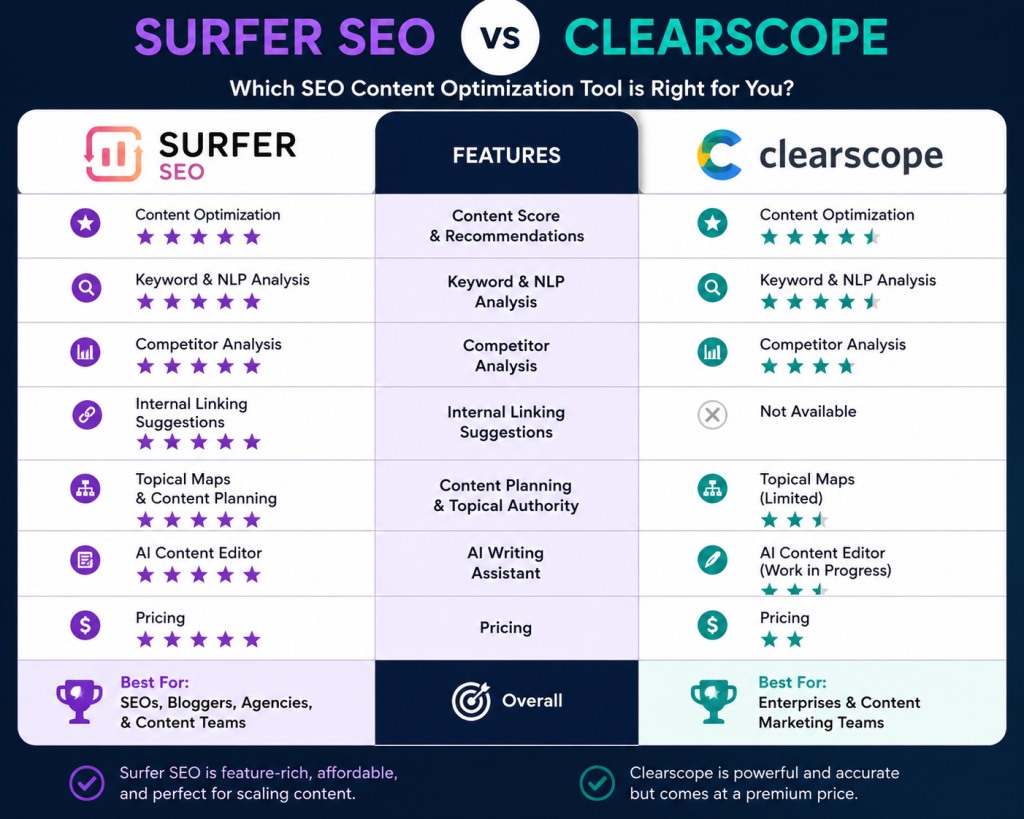
Feature Comparison Table
| Feature | Surfer SEO | Clearscope |
|---|---|---|
| Content scoring method | 0–100 numeric score | Letter grade (A++ to F) |
| Keyword research | Included | Not included |
| Content briefs / outlines | Included (Outline Builder) | Included (term-based briefs) |
| AI article writing | Included (Surfer AI) | AI Drafts (limited by plan) |
| SERP analysis | Included (SERP Analyzer) | Limited |
| Topical authority mapping | Included (Topical Maps) | Not included |
| Content audits for existing pages | Included | Not included |
| Google Docs integration | Yes | Yes |
| WordPress integration | Yes | Yes |
| GEO / AI search visibility tracking | Add-on | Included on some plans |
| Unlimited user seats | No (tiered) | Yes, all plans |
| Free trial | 7-day trial | Demo only, no trial |
| Starting price | $79–99/month | $129–189/month |
| Best known for | Data depth and tactical control | Simplicity and writer adoption |
Surfer SEO: A Closer Look
Surfer launched out of Wroclaw, Poland back in 2017, and it has since grown into one of the most widely used content optimization platforms on the market, with more than 150,000 users spanning agencies, in-house teams, and individual bloggers. The reason for that adoption isn’t mysterious once you spend time inside the platform: Surfer tries to cover the entire content lifecycle, not just the optimization step.
Content Editor is the core feature, and it’s the one most people are referring to when they talk about “Surfer.” You plug in a target keyword, and the editor analyzes the top-ranking pages for that term, then gives you a real-time score between 0 and 100 as you write. It flags specific NLP terms you should include, suggests a target word count range, recommends heading structures, and even checks your image count against what’s currently ranking. The score updates live, so you can watch it climb as you address each suggestion.
Keyword Research is built directly into the platform, which is a meaningful convenience. You’re not bouncing over to Ahrefs or Semrush to find your target term and then pasting it into Surfer separately you can research, cluster, and optimize without leaving the tab.
SERP Analyzer gives you a deep look at what’s actually working for the pages currently ranking content length, structure, domain authority, and the specific terms each competitor uses. If you’ve ever wondered why a seemingly thin article outranks your 3,000-word deep dive, this is where you go to find out.
Topical Maps extends the tool beyond single-page optimization into full content planning. You can map an entire topic cluster, see where you have coverage gaps, and plan out a content calendar that builds topical authority systematically rather than publishing disconnected one-off posts.
Surfer AI is the platform’s full article generation feature you can produce a long-form draft in a few minutes based on the SERP data Surfer has already gathered. It’s genuinely useful for getting a structurally sound first draft fast, though like most AI writing tools, the output benefits from a human editing pass before publishing.
Content Audit rounds things out by helping you identify which existing pages on your site are underperforming and exactly which sections, headings, or terms need updating to recover lost rankings. For sites with a large content library that’s started to decay, this feature alone can justify the subscription.

The tradeoff for all this functionality is interface complexity. New users often feel a bit lost the first time they open Surfer, bouncing between the Content Editor, Topical Map, Audit, SERP Analyzer, and Keyword Research tools trying to figure out where to start. It’s not unusable by any stretch most people find their footing within a session or two — but it’s a noticeably steeper learning curve than Clearscope’s.
Clearscope: A Closer Look
Clearscope takes the opposite bet: do one thing, and make it as frictionless as possible. The platform is built around a single core workflow generate a content report for your target keyword, hand it to a writer, and let them work inside a clean grading interface until they hit the score you’re targeting.
Grade-Based Scoring is Clearscope’s signature feature. Instead of a numeric score, your content gets a letter grade from A++ down to F, based on how comprehensively it covers the topic compared to top-ranking competitors. This sounds like a small difference, but in practice it changes how teams communicate. Telling a freelance writer “get this to a B before you submit” is a much easier instruction to give and follow than “get your Surfer score above 75.”
Term Recommendations are weighted by importance, so writers immediately know which terms genuinely move the needle on topic coverage versus which ones are minor additions. Each suggested term comes with example usage, which helps non-SEO writers understand not just what to include, but how to work it into a sentence naturally.
Google Docs Integration is where Clearscope really shines for editorial teams. The grading sidebar lives right inside Google Docs, pulling live data as the writer types, without requiring anyone to learn a separate editor. If your writers already live in Google Docs and most freelance and in-house writers do this removes a significant adoption barrier.
Content Inventory lets editors track and audit content across the entire site, organized by grade, so you can see at a glance which existing pages are underperforming on topic coverage.
AI Drafts is Clearscope’s answer to AI writing, though it’s positioned as a supplementary feature rather than the centerpiece it is for Surfer. The drafts give you a starting point, but Clearscope’s philosophy leans more toward human-written content enhanced by optimization data rather than AI-generated drafts polished after the fact.
What Clearscope doesn’t offer is just as important as what it does. There’s no built-in keyword research, no SERP analyzer, no topical mapping, and no content audit workflow comparable to Surfer’s. You’re buying a grading and term-recommendation engine full stop. For teams that already have keyword research handled through Ahrefs, Semrush, or an in-house SEO specialist, that narrow focus isn’t a weakness. It’s exactly what they’re looking for.
Clearscope’s client roster includes recognizable names like Adobe, Shopify, IBM, HubSpot, and Intuit, which speaks to the platform’s reliability at scale, even if that enterprise validation matters less to a solo blogger evaluating the tool for the first time.
Pricing Comparison (2026)
This is where the two platforms diverge most sharply, and it’s worth looking past the headline numbers because the real cost comparison depends heavily on team size and add-ons.
| Plan Tier | Surfer SEO | Clearscope |
|---|---|---|
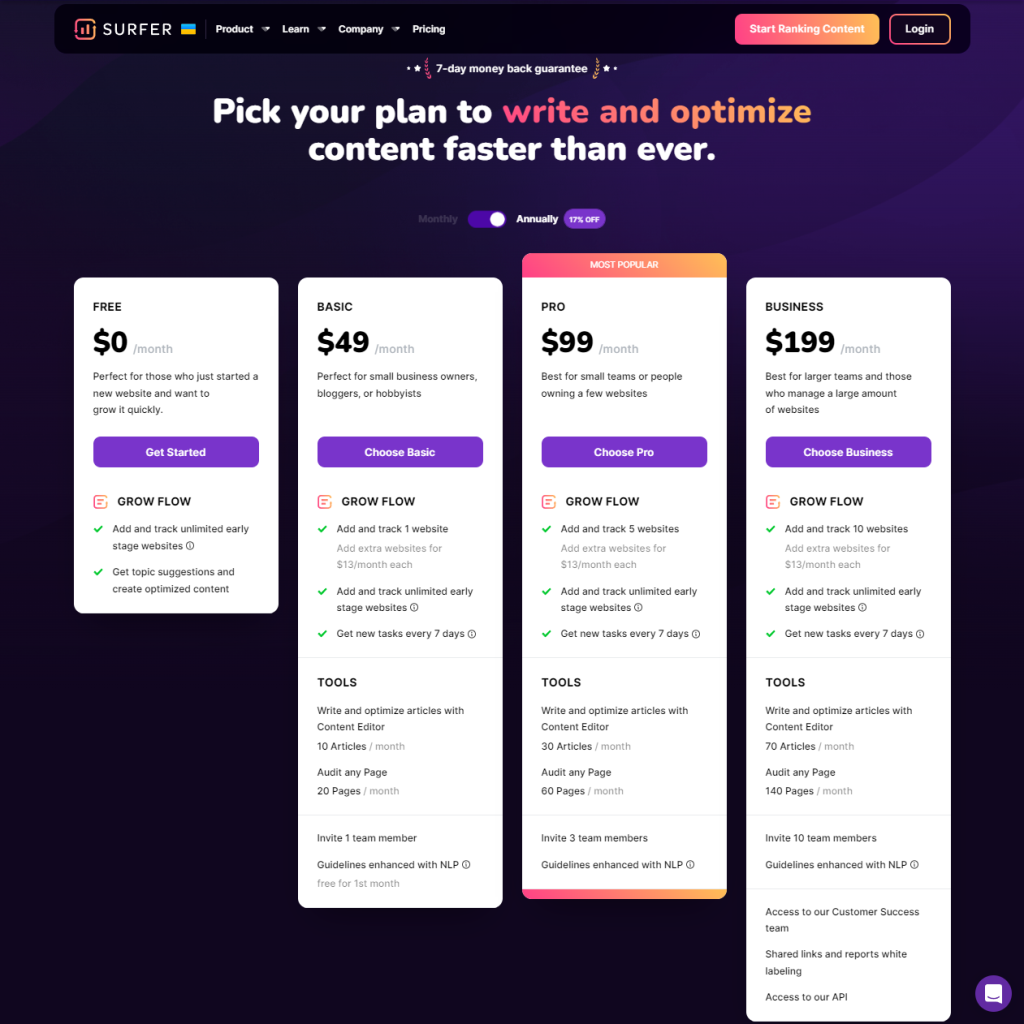
| Entry-level | $79–99/month (annual billing) | $129–189/month |
| Mid-tier | ~$129/month | ~$170–189/month |
| Enterprise | Custom pricing | $399/month (Business, unlimited credits) |
| User seats | Limited by tier | Unlimited on every plan |
| Free trial | 7-day trial available | Demo only, no trial |
| AI writing cost | Per-article fees beyond subscription | Included in AI Drafts allotment |
| Add-on costs | AI Tracker (GEO) is separate | Some plans bundle AI visibility tracking |
At face value, Surfer’s $79–99 entry point undercuts Clearscope’s $129–189 starting price by a wide margin. But the comparison gets more nuanced once you factor in two things.
First, Surfer’s AI writing and its AI Tracker (the add-on that monitors your visibility in AI-generated search results) both carry additional costs on top of the base subscription. Add those in, and the gap between the two platforms narrows considerably.
Second, Clearscope includes unlimited user seats at every tier, while Surfer’s seat allowances are more restrictive at lower plans. For a five-person content team, Clearscope’s unlimited-seat model can actually work out cheaper per user than Surfer’s tiered approach, even though the base subscription costs more. If you’re running a lean operation with one or two writers, this advantage disappears you’re just paying more for capacity you don’t need.
The practical takeaway: calculate cost per optimized article, not just the subscription price. A team publishing 30 articles a month on Surfer’s $99 plan is paying roughly $3.30 per article in tool costs. The same volume on Clearscope’s $189 plan runs closer to $6.30 per article unless your team size makes the unlimited seats the deciding factor.
Content Scoring: NLP Accuracy Compared
This is the question every serious content team eventually asks: whose recommendations are actually more reliable?
The honest answer is that it depends on content type, and reasonable, experienced SEOs land on different sides of this debate. Surfer’s NLP engine analyzes more signals reportedly more than 500 SERP-derived factors — and gives you a more granular numeric score. The tradeoff is that with more signals comes more noise. Surfer occasionally surfaces terms that feel forced or tangential to the actual topic, and writers without SEO experience sometimes find themselves stuffing in keywords that don’t improve the piece, just to nudge the score upward.
Clearscope’s term suggestions tend to be more tightly curated. There are fewer of them, but the ones it does surface are generally more directly relevant to search intent. Many experienced content strategists report that Clearscope’s grading feels slightly more aligned with what actually matters for ranking, particularly for informational and how-to content where comprehensive procedural coverage is the goal.
For straightforward comparison and listicle content, the difference between the two tools is small enough that it shouldn’t be the deciding factor. For technical or highly specialized topics where semantic precision really matters, Clearscope’s tighter term curation has a real edge. For high-volume content production where speed and breadth of data matter more than perfect precision, Surfer’s deeper signal set is the better fit.
One pattern worth noting from extensive side-by-side testing: both tools, when followed faithfully, produce well-optimized content that’s competitive with top-ranking pages. The practical difference shows up in the editing process. Surfer requires more judgment calls about which recommendations to actually follow versus ignore. Clearscope’s recommendations can be followed more literally, with less risk of over-optimizing.
Pros and Cons
Surfer SEO
Pros:
- More complete platform keyword research, content briefs, AI writing, and audits all included
- Lower entry price, especially for solo creators and small teams
- 7-day free trial lets you test before committing
- Surfer AI can generate a full draft in minutes, useful for high-volume production
- Topical Maps support long-term content strategy, not just single-page optimization
- Strong native integration with AI writing tools like Jasper
Cons:
- Steeper learning curve multiple tools and dashboards to navigate
- Add-on costs for AI writing credits and the AI Tracker (GEO) feature add up
- NLP term suggestions occasionally feel irrelevant or forced
- Team collaboration features are limited on lower-tier plans
- No technical SEO or backlink analysis still a single-purpose tool despite the broader feature set
Clearscope
Pros:
- Cleanest, simplest interface of any major content optimizer
- Letter-grade scoring is intuitive and easy to communicate across a writing team
- Unlimited user seats on every plan genuinely useful for larger editorial teams
- Term recommendations are tightly curated and well-aligned with search intent
- Seamless Google Docs integration where most writers already work
- Reliable, enterprise-grade platform trusted by major brands
Cons:
- Higher entry cost $129 to $189 per month minimum, excluding budget-conscious freelancers
- No free trial, only a demo, meaning you commit before fully testing
- No built-in keyword research, so you need a separate tool for that step
- English-focused multilingual content teams will need supplemental tools
- AI Drafts allotment doesn’t scale proportionally with price increases between tiers
- Narrow feature set means you’re paying a premium for optimization alone
Who Should Use Which Tool
Choose Surfer SEO if:
You’re a solo blogger, freelancer, or small agency that needs keyword research, content planning, and optimization all in one subscription. You want the option to generate AI drafts quickly when you’re working against a publishing deadline. You’re producing content at real volume ten or more articles a month where the lower per-article cost matters. You also want visibility into AI search platforms through the AI Tracker add-on, and you’re comfortable with a slightly steeper learning curve in exchange for more control.
Choose Clearscope if:
You manage a team of writers, especially freelance or external contributors, who need a dead-simple interface they can pick up in minutes. Budget is less of a constraint than workflow simplicity and editorial clarity. You already have keyword research covered through another tool like Ahrefs or Semrush, so you don’t need that functionality bundled in. You’re operating at enterprise scale with multiple seats, where Clearscope’s unlimited-user pricing model actually beats Surfer’s tiered approach on a per-user basis. You value Clearscope’s slightly more curated term suggestions for technical or specialized content.
Consider both, used differently:
Some agencies actually run both tools simultaneously Clearscope for client-facing content where simplicity and clean reporting matter, and Surfer for internal content production where deeper SEO data and AI drafting speed things up. It’s not the most budget-friendly approach, but for agencies juggling different client needs, it’s a legitimate strategy.
Real-World Testing Notes
A few things stood out after running the same set of articles through both platforms.
When I optimized a “best CRM software” comparison article using both tools side by side, Surfer’s score climbed faster in the early stages of writing because it surfaces more terms more aggressively. Clearscope took longer to reach a strong grade, but the term suggestions it did make were ones I’d have included anyway based on competitor research there was less second-guessing involved.
For a technical how-to piece setting up email authentication records for cold outreach Clearscope’s tighter term curation produced a noticeably cleaner brief. Surfer’s suggestions included a handful of tangential terms that, had I included them all, would have pulled the article slightly off-topic.
For a high-volume content sprint twelve articles published in a single month for an affiliate site Surfer’s all-in-one workflow saved real time. Researching keywords, building outlines, and scoring drafts without switching platforms added up to a meaningfully faster turnaround than handling keyword research separately and then switching to Clearscope for grading.
Neither tool replaces editorial judgment. Chasing a perfect score or top grade without applying common sense about what actually helps the reader is the fastest way to end up with mechanical, over-optimized content that reads worse than it ranks. Both platforms work best as a guide, not a rulebook to follow blindly.
If you’ve read other Surfer vs Clearscope breakdowns online, you’ve probably noticed most of them lean heavily toward one tool without explaining why that recommendation might not apply to your situation. This Surfer vs Clearscope analysis is built differently it walks through actual workflow differences, real pricing math, and testing notes so you can match the right tool to your own content operation instead of just following whichever platform paid for the loudest affiliate placement.
The Winner
If you’re forcing a single answer: Surfer SEO is the better overall value for most content creators in 2026. It does more keyword research, planning, AI writing, content audits, and optimization for a lower starting price, and the 7-day trial means you can validate that before committing your budget.
Clearscope wins on simplicity and team scalability. If you’re managing five or more writers, especially freelancers who need to be productive within minutes rather than hours, Clearscope’s unlimited seats and intuitive grading system are worth the premium. The narrower feature set isn’t a flaw here it’s the entire point.
The right call depends less on which tool is “better” in the abstract and more on an honest look at your own workflow. If you already have keyword research and content strategy handled elsewhere, and your priority is a clean, fast writer experience, Clearscope is hard to beat despite the higher price. If you want one platform that handles research, planning, writing, and optimization without juggling subscriptions, Surfer is the more practical choice.
FAQ
Is Surfer SEO better than Clearscope for beginners? Clearscope generally has the shorter learning curve thanks to its simple letter-grade system and clean Google Docs integration. Surfer offers more functionality but requires more time to learn where everything lives across its multiple tools.
Which tool is cheaper, Surfer or Clearscope? Surfer SEO is cheaper at the entry level, starting around $79–99 per month versus Clearscope’s $129–189 per month. However, Clearscope’s unlimited user seats can make it more cost-effective for larger teams once you calculate cost per user.
Does Clearscope offer a free trial? No. Clearscope offers a demo so you can see the platform in action, but there is no free trial period. Surfer SEO offers a 7-day free trial, which makes it easier to test before paying.
Can I use Surfer SEO and Clearscope together? Yes, and some agencies do exactly that — using Clearscope for client-facing content where simplicity matters and Surfer for internal production where deeper SEO data and AI writing speed things up. It’s not the most economical setup, but it’s a legitimate strategy for teams with varied needs.
Which tool has more accurate NLP recommendations? Neither tool is definitively more accurate — it depends on content type. Clearscope’s term suggestions tend to be more tightly curated and intent-aligned, which helps for technical or specialized topics. Surfer analyzes more signals overall, which benefits high-volume content production where breadth matters more than precision.
Does Surfer SEO include keyword research? Yes. Keyword research is built directly into Surfer’s platform, letting you research, cluster, and optimize content without switching to a separate tool. Clearscope does not include keyword research at any price tier.
Is Clearscope worth it for a solo blogger? Probably not. Clearscope’s pricing and unlimited-seat model are built for teams with multiple writers. A solo blogger is unlikely to need that scalability and will generally get better value from Surfer’s lower entry price and broader feature set.
What’s the main difference between Surfer’s score and Clearscope’s grade? Surfer gives you a numeric score from 0 to 100 based on over 500 SERP-derived signals. Clearscope gives you a letter grade from A++ to F based on topic coverage compared to top-ranking competitors. The letter-grade system is generally easier to communicate to a writing team, while the numeric score offers more granular feedback.
Final
Surfer SEO and Clearscope are both genuinely capable content optimization platforms, and either one will meaningfully improve your content’s chances of ranking when used thoughtfully. The decision isn’t about which tool is objectively superior — it’s about matching the platform to your team size, budget, and existing workflow.
If you want one subscription that covers keyword research, content planning, AI drafting, and optimization scoring, Surfer SEO delivers more for less money, with a trial period that lets you confirm it’s the right fit before you commit. If you’re managing a team of writers who need a frictionless, intuitive grading system — and you already have your keyword research and content strategy sorted elsewhere Clearscope’s premium price buys you genuine simplicity and reliability at scale.
Either tool removes the guesswork from on-page optimization. What you do with the recommendations they give you is still up to you and that’s the part no software can replace.
Ready to put either tool to the test? Start with whichever trial or demo fits your workflow, run a real article through it, and judge the results against your own editorial standards before locking in a subscription.